Managing Floor Plan Sensor Overlaps
Managing Sensor Overlaps
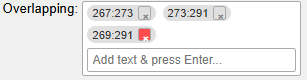
In the Overlapping section (top menu), you can mark instances where two or more sensors might detect activity in the same area. This helps clarify presence data and improves tracking.

To add an overlap:
- Type the overlap name into the text box.
- A labeled text bubble will appear in the section.
To delete an overlap:
- Hover over the X on the right of the bubble. It will turn red.
- Click it to remove the entry.